Apple prides itself on thinking and being different to everyone else.
It acknowledges competitors like Microsoft and Google only grudgingly,
and usually in a way that only illustrates how much nicer and more
prosperous its own Mac and iPhone platforms are. It will have hurt that
pride, therefore, to have to announce today that the big new Apple
initiative, Apple Music, will be available on iPhones, iPads, Macs, PCs, and Android.
Showing posts with label news. Show all posts
Showing posts with label news. Show all posts
Thursday, June 11, 2015

The simple trick iOS 9 uses to improve your battery life the instant you install it
ios-9-1
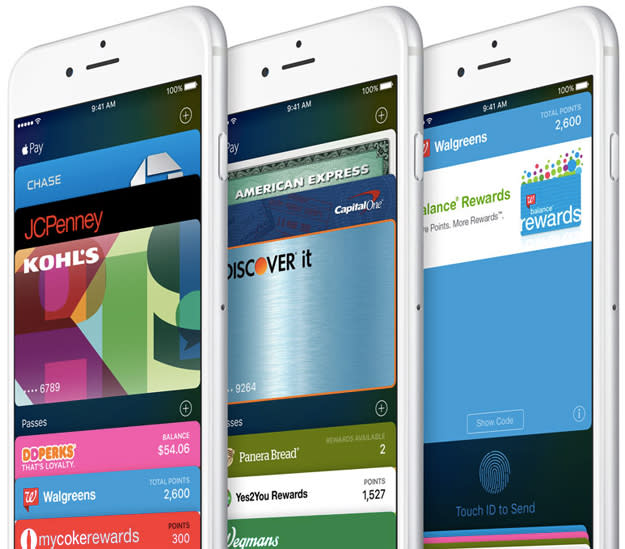
Apple took the wraps off of the next-generation iOS 9 platform during its big
WWDC 2015 keynote on Monday, and there’s a lot to digest. You can visit our WWDC 2015 hub to learn more about the new software, or you can skip right to our post on the 5 best new features in iOS 9 for a cheat sheet.
During the company’s presentation, Apple
revealed that iOS 9 will feature some big improvements that focus on
battery life. Interestingly, the company said that iOS 9 will improve an
iOS device’s battery life by about an hour just by installing it.
So, how exactly does iOS 9 add an hour in between charges?
The
battery life improvements that come with iOS 9 certainly aren’t among
the platform’s flashiest new features, but battery life remains
smartphone users’ biggest concerns. As such, gaining an extra hour in
between charges will be a welcome change indeed.
This
change will also be of particular interest considering the fact that
iPhones aren’t top performers in the battery department when compared to
rivals.
Apple
has plenty of optimizations in iOS 9 that contribute to the big battery
life gains, but there’s one simple trick in particular that will have a
dramatic impact on battery life without disrupting usage at all. In
fact, this little trick seems so elementary that you’ll wonder why it
took Apple so long to implement it.
From Apple’s iOS 9 page:
Across the entire operating system, apps and key technologies have been made more efficient to trim battery usage wherever possible — so you get more battery life for the things you do every day. Thanks to ambient light and proximity sensors, your iPhone knows if it’s facedown on the table and prevents the screen from turning on, even when you receive a notification. And the new Low Power mode lets you extend your battery life even further.
Can
you believe how simple that is? When an iPhone is facedown on your desk
or a table, there is absolutely no reason to illuminate the display as
new notifications arrive. After all, the display is always one of the
biggest culprits on any smartphone when it comes to battery drain.
Wednesday, June 10, 2015
The future of the iPhone is here: Apple unveils iOS 9
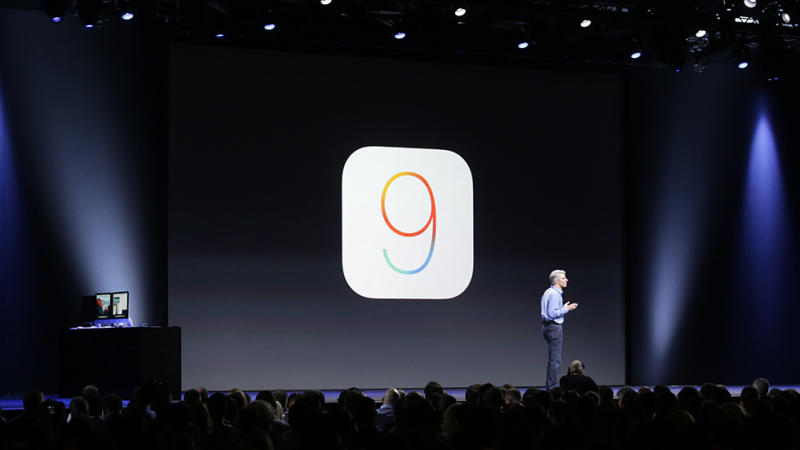
The moment iPhone fans have been waiting for is here: Apple has unveiled iOS 9.
Apple says that its main goals with iOS 9 are to add intelligence to
enhance how you use your device without compromising privacy while
enhancing the apps you use most. First, for iOS 9 Siri has a new user
interface and is able to respond to a more diverse array of commands.
Apple is making Siri more proactive by making it easier to set
reminders, to offer suggestions for people who you might want to contact
based on upcoming meetings as well as one-tap location suggestions.
10 Mind-blowing Things You Didn't Know You Could Do With Your iPhone
Sure, you're a master of Instagram, your Seamless order is saved, and
you can Tinder on the sly, but your iPhone can do more than just get
you dinner and a date (and you know, make calls). Here, a list of 10
unexpected ways to use your smartphone.
Unlock Your Car

Always losing your keys? The Viper SmartKey system allows you to replace your car keys with your phone. When enabled, you can lock and unlock your car (and even disarm an alarm) without even taking your phone out of your pocket.
Light Your Home

Cree's LED lightbulb connects to your phone via an app, turning your device into a dimmer you don't have to install. (Bonus: You can set the amount of time the light stays on without even being in the room, saving you money throughout the year).
• • •
Check Your Heart Rate

You don't need to invest in a Jawbone or a Fitbit to monitor your heart rate. Azumio's Instant Heart Rate app measures your heart rate and gives you personalized reports to help you burn more calories and track your health.
• • •
Order a Drink

There are a million reasons why you might not want to leave the house to
get a drink, but if you haven't perfected your home bar set up yet, use
Minibar to order wine, liquor, or mixers—right from your phone.
• • •
Take a Nap

Who doesn't need an afternoon siesta from time to time? With Breather,
you can find a room to rent for a minimum of 30 min so you can take a
break from city life—or do whatever else you need to do with a room for a
half-hour.
• • •
ID an Image

You might be familiar with the Shazam app's ability to identify a song, but late last month the service added image-identifying technology to its skill set. Just hold your phone up to an image, and Shazam will tell you what you're seeing and display matching content.
• • •
Do Not Disturb

Whether you're in a movie or your friends are night owls, there are times when you just don't want to be disturbed (and silent mode won't cut it). Did you know that built right into your phone is a Do Not Disturb mode (it's under the Settings tab) that will stop texts, alarms, and alerts from coming through?
• • •
Translate

Taking a trip and forgot the pocket dictionary? Google's Translate app can translate two languages in real time, so you can have a conversation (or just find a bathroom). The app also works with text, making foreign-language signs easy to understand.
• • •
Predict the Weather

Yes, the weather app on your phone can tell you how to dress for the day, but it can't give you minute-by-minute updates. Dark Sky not only shows you a radar screen but also lets you know when it's going to rain down to the minute, so you can time your coffee breaks accordingly.
• • •
Create an Augmented Reality Map

If you're driving in the dark, the rain, fog, or just unfamiliar conditions, download Hudway, enter your destination, and put your phone on your dashboard. Your phone will project a GPS-enabled map on your windshield—no extra equipment required.
8 cool features coming to your iPhone and iPad that Apple didn't mention yet
Apple's WWDC developers
conference event lasted over two hours Monday, but it still couldn't fit
in time to reveal and demonstrate all the new features and updates
we'll find in iOS 9, the upcoming operating system for iPhones and
iPads. We've picked out some of the cool features they couldn't
demonstrate at WWDC that you'll surely find useful.
Tuesday, June 9, 2015
Why Do People Buy Dumb Phones Instead of Smartphones?
While a smartphone and all of its accompanying apps and
features seems like the ultimate of modern necessities, millions
of people still opt not to use a phone that affords them the convenience
of the Internet in their pockets. Instead, for a variety of reasons —
including lower initial cost, better battery life, cheaper
Why Android’s “factory reset” isn’t really secure
One day soon you may want to
trade in your smartphone for a newer, better model. And before you do,
you’ll want to delete all your photos, e-mails, app accounts, and other
personal data—anything you wouldn’t want to get into a stranger’s hands.
The standard advice is to do a factory data reset,
which you can access in the phone’s Settings menu. The name implies
that hitting reset will take your phone back to the clean, data-free
state it was in when it left the factory. But that’s not quite true, at
least on an Android phone. Hitting the reset button is like clicking
“empty trash” on a desktop computer. The data may still be there, but
there’s no longer a file name pointing to it, and the space it is
occupying is now free for the next bit of data that comes along looking
for a home.
For that reason, a skilled
technician often can recover data from an Android phone that has gone
through a factory reset. Steve Hruska, a hardware R&D engineer at a
data-recovery service called Kroll Ontrack,
does this for a living. He rescues files from devices that would
otherwise have been lost to floods, fires, even fits of rage. (It’s an
expensive service—Kroll Ontrack’s fees start at $500.) This is good if
you’ve broken your device, but bad if you’re trying to sell it.
There are three steps you can take to make your data harder to recover.
The simplest method is to encrypt your phone. Newer Apple phones
and Blackberries encrypt their data by default, which boosts security
throughout the life of the device. If you’ve got an Android phone, go to
Settings, then tap Security, then Screen Lock or Encrypt Device. Create
a PIN or password, if you haven’t done that already. Then, encrypt the
device. Just remember to plug in your phone to its charger first, as the
process can take more than an hour, depending on your hardware.
Ideally, you’d encrypt your phone the day you bring it home from the
store, in case it’s ever lost or stolen. But if you want to safely sell
your phone, encrypt it before doing a factory reset.
Surprisingly, this step may not make your phone as
secure as you’d like, according to Hruska. “Even on an encrypted
Android phone, a factory data reset performed via the OS can leave
behind the encryption keys that would allow someone to recover files,”
he says. The details vary depending on the specific Android device you
own—and, by the way, there’s some inconsistency in Apple devices, as
well. On some of Apple’s devices, a factory reset will delete the
encryption keys necessary to read the data, while on other devices the
data will be overwritten with dummy data.
The second
step you can take is to Google “hard reset” and the name of your Android
phone, and follow the directions. (The procedure varies by manufacturer
and model.) You’ll probably end up holding down the power and volume
buttons, selecting an option like “reboot” or “factory reset” from a
rudimentary menu, and restarting your phone several times. (You may also
have to stand on one foot while humming La Marseillaise.)
One site I like, www.resethard.com,
provides both written and video-based step-by-step instructions for
hard resetting a large number of old and new Android phones.
This should securely kill the encryption keys and make data recovery much more difficult.
The third
step you can take—and this should be considered mandatory—is to remove
the memory card, if that’s possible with your phone model. You can save
it for your next phone, or smash it with a hammer.
Here’s how you’ll
find it. If your phone has a removable back cover, pry it open open and
look for the card (about the size of a thumbnail) under or next to the
battery and SIM card (also about the size of a thumbnail). If your
phone’s cover doesn’t come off, look for a pinhole along the sides of
the phone, and stick a pin or an opened paper clip into it. That should
pop out a tray with the memory card. Sometimes the SIM card will be next
to it, which you may need if your next phone will be with the same
carrier. Don’t poke anything into the holes near the top or bottom of
the phone because they’re likely there for a speaker or microphone.
As a final note, even these steps may not make it
absolutely impossible to recover data off your phone. But the reality
is, there are easier ways to steal someone’s data, from phishing scams
to bogus apps that trick you into typing in your user IDs and passwords.
Unless you’re a high-profile CEO, government official, or sexy
celebrity, it’s highly unlikely anyone will devote enough effort and
skill to hack into your old Galaxy S4 in order to retrieve your Facebook
ID. Take reasonable steps to erase your phone’s data, and you should be
fine.
Galaxy Note 5 Camera Details Emerge
According to the latest rumors related to the Galaxy Note 5, Samsung Electronics Co., Ltd. (LON:BC94) (KRX:005930) will be responding strongly to Apple Inc. (NASDAQ:AAPL)’s efforts with the iPhone 7 camera.
Recent reports suggest that Samsung is currently working on a
particularly outstanding camera for the Galaxy Note 5, and if these
suggestions are correct then the device may feature an f/1.8 lens.
iPhone 6s Plus rumored to match the Galaxy Note 4 with a 2K display of its own
Apple
has never engaged in specs-matching wars with the competition when it
comes to the iPhone and has thus drawn some criticism for its hardware
choices regarding screen resolutions, camera megapixels, processor cores
or the amount of RAM it offers. But that’s about to change this year,
as Apple’s iPhone 6s will reportedly finally match Android flagship devices when it comes to one key component.
Monday, June 8, 2015
Xiaomi Mi5, Xiaomi Mi5 Plus to be powered by the Qualcomm Snapdragon 820?
 A
report published today indicates that Xiaomi will be following in the
footsteps of other smartphone manufacturers by offering a regular
A
report published today indicates that Xiaomi will be following in the
footsteps of other smartphone manufacturers by offering a regular Galaxy S6 Plus Images Leaked, Fall Release Mooted
But some reports emerging from Korea suggest that we may not have seen the last Galaxy S6 release after all. While attention at Samsung Electronics Co., Ltd. (LON:BC94) (KRX:005930) was
Why You Should Plan to Download Microsoft’s Windows 10
Microsoft
just announced when Windows 10, the first major operating system
release since Windows 8, will be available for download. And you can
already find all of the information you need to decide whether you’re
going to download the next major version of Microsoft’s operating
system.
Why So Many Apple Fans Choose ‘S’ Model iPhones
Many Apple fans skip the company’s major releases and instead opt for
the upgraded version that debuts a year after with an “S” after the
model’s number. Apple has used the “S” designator since releasing the
iPhone 4s in 2011. S models are an upgraded version of the previous
year’s iPhone and typically feature internal updates to the camera,
processor, or battery without the dramatic upgrades of a newly numbered
version.
Saturday, June 6, 2015
5 free Android apps that do amazing things Apple’s iPhone can’t
The Android
vs. iPhone debate is a tedious one, but don’t expect it to slow down
anytime soon. While this endless debate can often be boring for those of
us who aren’t overly enthusiastic users — “fanboys” — there are some
aspects of the iOS vs. Android rivalry that are pretty interesting.
Samsung Galaxy S6 'Active' Confirmed, Key Features Missing
The elusive Samsung Galaxy S6 Active has appeared on a Samsung support page, adding fuel to the rumour that its launch is imminent.
What’s strange is that according to the listed specifications, it’s almost identical to the regular Samsung Galaxy S6.
Friday, June 5, 2015
Lenovo LaVie Z 360: Insanely thin and light (hands on)
The laptop from Lenovo and NEC surprises everyone who picks it up, as it is as light as the MacBook yet has a bigger display and a powerful Core i7 processor.
These are the Android apps that are draining your battery, using your storage and slowing your phone
AVG Technologies released its quarterly list of the Android apps that it
says are having a negative impact on your phone. These are the apps
that are draining your battery, eating all of your memory and consuming
all of your data. The metrics from over 1 million Android units was
examined and music streamer Spotify tops the list of apps that have an
overall negative impact on the performance of your phone.
Samsung just accidentally revealed nearly everything about its next phone
Samsung usually releases a version of its flagship phone that is more
durable than its standard phones. And now we're getting a closer look
at what that more rugged version of the Galaxy S6 will be like.
This week, Samsung posted a user manual on its US mobile website that
reveals a ton of details about the so-called Galaxy S6 Active. The
manual has since been taken down, but 9to5Google saved a photo of the phone and a few details about it before the document was removed:
Subscribe to:
Posts (Atom)